> ## Documentation Index
> Fetch the complete documentation index at: https://heygen-1fa696a7.mintlify.site/llms.txt
> Use this file to discover all available pages before exploring further.
# Create Studio Template via API
> Create a template from a video you generated with the API or saved in the HeyGen editor, then mark which parts change. The API version of "Create template" and the editor's variable panel, so the whole template loop runs from code.
Create Studio templates **via the API**: turn a video into a reusable template and mark which parts change, without opening the HeyGen editor. Make one good video, promote it to a template, declare its variables, then generate a personalized version per agent, listing or customer.
## What this adds
You could already **use** templates over the API: list them, read them, and generate videos from them. Creating a template and marking its variables needed the HeyGen editor. The authoring endpoints add that first half, so the whole loop runs from code.
| Step | Before | Via the API |
| - | - | - |
| Turn a video into a template | **Create template** on the Videos page | `POST /v3/templates` |
| Mark the parts that change | The editor's **API variable** menu, or typing `{{name}}` | `PUT /v3/templates/{template_id}/variables` |
| Rename or delete it | The template library | `PATCH` / `DELETE /v3/templates/{template_id}` |
| Generate videos | `POST /v3/templates/{template_id}` | Same endpoint, unchanged |
It works with videos you generate through the API, so the whole pipeline runs without a manual step.
Authoring is about **what changes**, not layout. Positions, timing and scenes come from the source video. To change those, edit the template in the HeyGen editor.
Built your template in the HeyGen editor instead? See [Building a Studio Template](/templates-guide).
## The endpoints
| Endpoint | What it does | Scopes |
| - | - | - |
| [`POST /v3/templates`](/reference/create-template-from-video) | Create a template from a video | `templates:write`, `videos:read` |
| [`GET /v3/templates/{template_id}`](/reference/get-template) | Read a template and its composition | `templates:read` |
| [`PUT /v3/templates/{template_id}/variables`](/reference/set-template-variables) | Declare the template's variables | `templates:write` |
| [`POST /v3/templates/{template_id}`](/reference/generate-video-from-template) | Generate a video from the template | `templates:read`, `videos:write` |
| [`PATCH /v3/templates/{template_id}`](/reference/update-template) | Rename a template | `templates:write` |
| [`DELETE /v3/templates/{template_id}`](/reference/delete-template) | Delete a template | `templates:write` |
The rest of this page builds one real-estate listing template end to end. The agent introduces a property over a photo of the house, and four things become swappable: **the agent** (avatar), **their voice**, **the listing photo**, and **four phrases** in the script.
## Before you start
* An **API key**, sent as the `x-api-key` header.
* A **Creator role or higher** in the workspace, with template creation allowed in the workspace settings. Otherwise the authoring endpoints return `403` `forbidden`.
* A **source video**. It must be one you generated with `POST /v3/videos`, or one you created or saved in the HeyGen editor. URL-to-Video and older editor videos can't be used (`template_source_unsupported`).
* Your own **IDs**. The video, template and element IDs in the examples won't exist in your workspace. Use the ones your responses return. Brandon and Caroline are public avatars and voices, so those IDs work anywhere.
Want something you can run as-is? [The whole flow in one script](#the-whole-flow-in-one-script) passes each ID to the next step for you.
## Step 1: Make the source video
Write the script with real values, not placeholders. Anything you later want to swap should appear as plain text you can point at, like `42 Maple Lane`. Here the listing photo is the background, and the avatar's own background is removed so the photo shows behind them.
```bash cURL theme={null}
curl -X POST "https://api.heygen.com/v3/videos" \
-H "x-api-key: YOUR_API_KEY" \
-H "Content-Type: application/json" \
-d @- <<'JSON'
{
"type": "avatar",
"title": "Listing - 42 Maple Lane (template source)",
"avatar_id": "Brandon_Business_Standing_Front_public",
"voice_id": "513b14b431b64a578c467c480dd0a9c3",
"script": "Hi, I'm Brandon with Bayview Realty. Take a look at 42 Maple Lane: three bedrooms, a sunny kitchen, and a backyard made for summer. It's listed at $749,000. Book your private tour today.",
"remove_background": true,
"background": {
"type": "image",
"url": "https://images.unsplash.com/photo-1568605114967-8130f3a36994?w=1920&q=80"
},
"aspect_ratio": "16:9",
"resolution": "1080p"
}
JSON
```
```python Python theme={null}
import requests
API = "https://api.heygen.com"
HEADERS = {"x-api-key": "YOUR_API_KEY"}
video = requests.post(f"{API}/v3/videos", headers=HEADERS, json={
"type": "avatar",
"title": "Listing - 42 Maple Lane (template source)",
"avatar_id": "Brandon_Business_Standing_Front_public",
"voice_id": "513b14b431b64a578c467c480dd0a9c3",
"script": (
"Hi, I'm Brandon with Bayview Realty. Take a look at 42 Maple Lane: three bedrooms, "
"a sunny kitchen, and a backyard made for summer. It's listed at $749,000. "
"Book your private tour today."
),
"remove_background": True,
"background": {"type": "image", "url": "https://images.unsplash.com/photo-1568605114967-8130f3a36994?w=1920&q=80"},
"aspect_ratio": "16:9",
"resolution": "1080p",
}).json()["data"]
video_id = video["video_id"]
```
```javascript JavaScript theme={null}
const API = "https://api.heygen.com";
const HEADERS = { "x-api-key": "YOUR_API_KEY", "Content-Type": "application/json" };
const { data: video } = await (await fetch(`${API}/v3/videos`, {
method: "POST",
headers: HEADERS,
body: JSON.stringify({
type: "avatar",
title: "Listing - 42 Maple Lane (template source)",
avatar_id: "Brandon_Business_Standing_Front_public",
voice_id: "513b14b431b64a578c467c480dd0a9c3",
script: "Hi, I'm Brandon with Bayview Realty. Take a look at 42 Maple Lane: three bedrooms, a sunny kitchen, and a backyard made for summer. It's listed at $749,000. Book your private tour today.",
remove_background: true,
background: { type: "image", url: "https://images.unsplash.com/photo-1568605114967-8130f3a36994?w=1920&q=80" },
aspect_ratio: "16:9",
resolution: "1080p",
}),
})).json();
const videoId = video.video_id;
```
```json Example response theme={null}
{
"data": {
"output_format": "mp4",
"status": "waiting",
"video_id": "3c8e1f6a9b2d4c7e8a5f0b1d6e9c2a47"
}
}
```
You don't have to wait for the render. A template copies the video's draft, not its rendered file, so you can create it as soon as you have the `video_id`.
## Step 2: Promote it to a template
Pass the video ID and, optionally, a name (it defaults to the video's title). The template is private to your workspace and starts with **no variables**.
```bash cURL theme={null}
curl -X POST "https://api.heygen.com/v3/templates" \
-H "x-api-key: YOUR_API_KEY" \
-H "Content-Type: application/json" \
-d '{"video_id": "3c8e1f6a9b2d4c7e8a5f0b1d6e9c2a47", "name": "Listing video - agent intro"}'
```
```python Python theme={null}
template = requests.post(f"{API}/v3/templates", headers=HEADERS, json={
"video_id": video_id,
"name": "Listing video - agent intro",
}).json()["data"]
template_id = template["id"]
```
```javascript JavaScript theme={null}
const { data: template } = await (await fetch(`${API}/v3/templates`, {
method: "POST",
headers: HEADERS,
body: JSON.stringify({ video_id: videoId, name: "Listing video - agent intro" }),
})).json();
const templateId = template.id;
```
```jsonc Example response (201 Created, abbreviated) theme={null}
{
"data": {
"id": "6f2a9c4e1b7d4f3a8e5c2b9d0a1f7e64",
"name": "Listing video - agent intro",
"source_video_id": "3c8e1f6a9b2d4c7e8a5f0b1d6e9c2a47",
"edit_version": "0",
"variables": {},
"composition": {
"scenes": [
{
"id": "scene_0_1790737769242_zrnu3qfqm",
"background": {
"id": "bg_image_0_1790737769242_8e1hrymj6",
"type": "image",
"url": "https://static.heygen.ai/example-listing-photo.jpg",
"bindable_as": ["image"]
},
"elements": [
{
"id": "avatar_0_1790737769242_ltg7rc9hp",
"type": "avatar",
"avatar_id": "Brandon_Business_Standing_Front_public",
"bindable_as": ["character"]
}
],
"script": [
{
"id": "script_0_1790737769242_2bae1yu2m",
"type": "text",
"text": "Hi, I'm Brandon with Bayview Realty. Take a look at 42 Maple Lane: three bedrooms, a sunny kitchen, and a backyard made for summer. It's listed at $749,000. Book your private tour today.",
"voice_id": "513b14b431b64a578c467c480dd0a9c3",
"bindable_as": ["voice", "text"]
}
]
}
],
"background_audio": []
},
// also returned: aspect_ratio, created_at, updated_at, thumbnail_url, voice_settings, and the older scenes and scene_ids
}
}
```
The response is the full template. Note its `id`: every call after this one uses it. Two other fields matter for the next steps: `composition`, which lists every part of the video, and `edit_version`, which starts at `"0"`.
## Step 3: Find the parts you can swap
`composition.scenes` describes each scene. Every part that can take a variable has an `id` and a `bindable_as` list, which says what kind of variable it accepts.
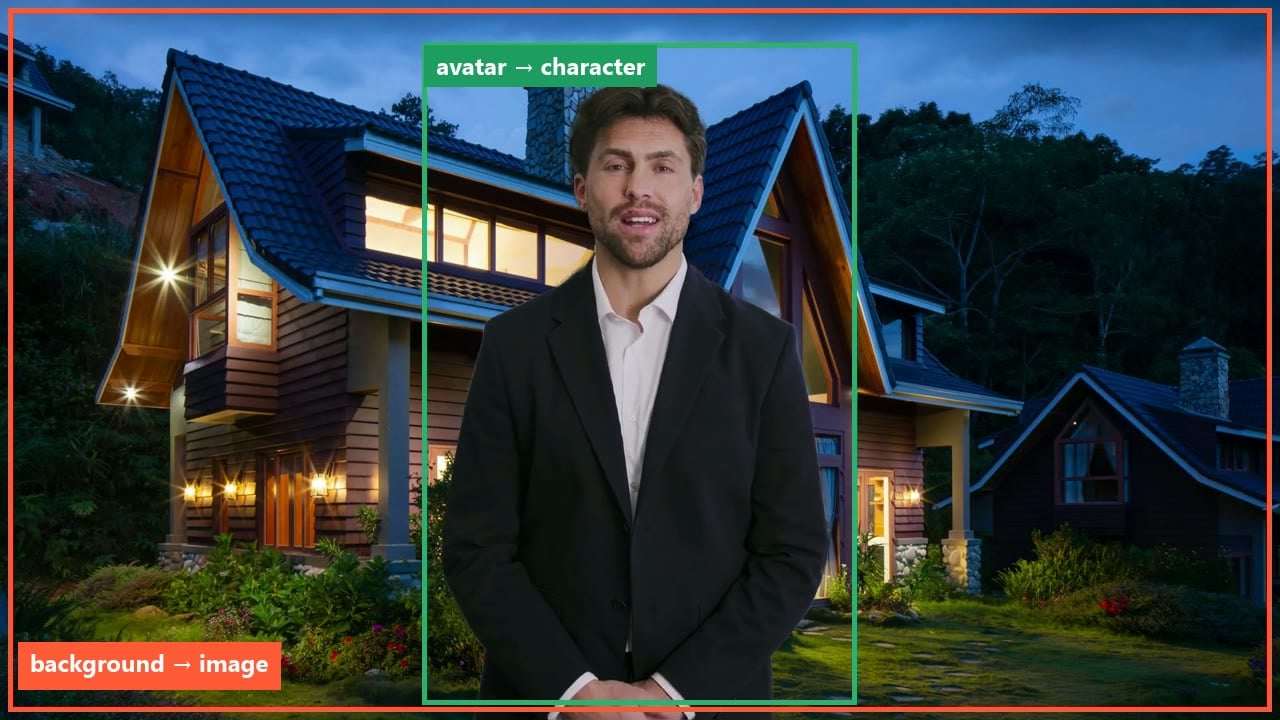
In this template there are three parts:
| Part | Where it is in the response | `id` | `bindable_as` |
| - | - | - | - |
| The listing photo | `composition.scenes[0].background` | `bg_image_0_1790737769242_8e1hrymj6` | `image` |
| The agent on screen | `composition.scenes[0].elements[0]` | `avatar_0_1790737769242_ltg7rc9hp` | `character` |
| The spoken line | `composition.scenes[0].script[0]` | `script_0_1790737769242_2bae1yu2m` | `voice`, `text` |
Your template will have different IDs. Take them from the `composition` in your own response.
A template can also contain on-screen text, image and video elements, and `composition.background_audio` tracks for music and sound effects that bind as `audio`. Call `GET /v3/templates/{template_id}` at any time to read the same structure again.
The response also still includes the older `scenes` and `scene_ids` fields. They are kept for existing integrations. Use `composition` for anything new.
## Step 4: Declare the variables
A variable is a name plus the part it controls. There are two ways to create one, and most templates use both.
For `character`, `voice`, `image`, `video` and `audio` variables. Point at a part from Step 3. Each part takes at most one of these.
For `text` variables. Give the exact, case-sensitive text. Every occurrence in the script and on-screen text becomes `{{name}}`, and the matched text becomes the default. Add `element_ids` to limit it to specific parts.
`PUT` replaces the template's complete list of variables. On a template that already has variables, read it first and send the full list with its current `edit_version`. [More on this below](#the-put-replaces-the-whole-list).
We bind the agent, their voice and the listing photo, and turn four phrases into text variables:
```bash cURL theme={null}
curl -X PUT "https://api.heygen.com/v3/templates/6f2a9c4e1b7d4f3a8e5c2b9d0a1f7e64/variables" \
-H "x-api-key: YOUR_API_KEY" \
-H "Content-Type: application/json" \
-d @- <<'JSON'
{
"expected_edit_version": "0",
"variables": {
"agent": {
"type": "character",
"element_id": "avatar_0_1790737769242_ltg7rc9hp"
},
"agent_voice": {
"type": "voice",
"element_id": "script_0_1790737769242_2bae1yu2m"
},
"listing_photo": {
"type": "image",
"element_id": "bg_image_0_1790737769242_8e1hrymj6"
},
"agent_name": {
"type": "text",
"match": "Brandon"
},
"brokerage": {
"type": "text",
"match": "Bayview Realty"
},
"address": {
"type": "text",
"match": "42 Maple Lane"
},
"price": {
"type": "text",
"match": "$749,000"
}
}
}
JSON
```
```python Python theme={null}
scene = template["composition"]["scenes"][0]
avatar = next(e for e in scene["elements"] if "character" in e["bindable_as"])
template = requests.put(f"{API}/v3/templates/{template_id}/variables", headers=HEADERS, json={
"expected_edit_version": template["edit_version"],
"variables": {
"agent": {"type": "character", "element_id": avatar["id"]},
"agent_voice": {"type": "voice", "element_id": scene["script"][0]["id"]},
"listing_photo": {"type": "image", "element_id": scene["background"]["id"]},
"agent_name": {"type": "text", "match": "Brandon"},
"brokerage": {"type": "text", "match": "Bayview Realty"},
"address": {"type": "text", "match": "42 Maple Lane"},
"price": {"type": "text", "match": "$749,000"},
},
}).json()["data"]
```
```javascript JavaScript theme={null}
const scene = template.composition.scenes[0];
const avatar = scene.elements.find((e) => e.bindable_as.includes("character"));
const { data: updated } = await (await fetch(`${API}/v3/templates/${templateId}/variables`, {
method: "PUT",
headers: HEADERS,
body: JSON.stringify({
expected_edit_version: template.edit_version,
variables: {
agent: { type: "character", element_id: avatar.id },
agent_voice: { type: "voice", element_id: scene.script[0].id },
listing_photo: { type: "image", element_id: scene.background.id },
agent_name: { type: "text", match: "Brandon" },
brokerage: { type: "text", match: "Bayview Realty" },
address: { type: "text", match: "42 Maple Lane" },
price: { type: "text", match: "$749,000" },
},
}),
})).json();
```
```jsonc Example response (200 OK, abbreviated) theme={null}
{
"data": {
"id": "6f2a9c4e1b7d4f3a8e5c2b9d0a1f7e64",
"edit_version": "1",
"composition": {
"scenes": [
{
"background": { "id": "bg_image_0_1790737769242_8e1hrymj6", "variable": "listing_photo" },
"elements": [{ "id": "avatar_0_1790737769242_ltg7rc9hp", "variable": "agent" }],
"script": [
{
"id": "script_0_1790737769242_2bae1yu2m",
"text": "Hi, I'm {{agent_name}} with {{brokerage}}. Take a look at {{address}}: three bedrooms, a sunny kitchen, and a backyard made for summer. It's listed at {{price}}. Book your private tour today.",
"text_variables": ["agent_name", "brokerage", "address", "price"],
"variable": "agent_voice"
}
]
}
]
},
"variables": {
"address": { "content": "42 Maple Lane", "type": "text" },
"agent": { "type": "character", "avatar_id": "Brandon_Business_Standing_Front_public" },
"agent_name": { "content": "Brandon", "type": "text" },
"agent_voice": { "type": "voice", "voice_id": "513b14b431b64a578c467c480dd0a9c3" },
"brokerage": { "content": "Bayview Realty", "type": "text" },
"listing_photo": {
"asset": {
"type": "url",
"url": "https://images.unsplash.com/photo-1568605114967-8130f3a36994?w=1920&q=80"
},
"fit": "contain",
"type": "image"
},
"price": { "content": "$749,000", "type": "text" }
},
// also returned: the rest of the template, as in Step 2
}
}
```
Look at `composition.scenes[0].script[0].text` in the response. The four phrases are now placeholders:
```text theme={null}
Before: Hi, I'm Brandon with Bayview Realty. Take a look at 42 Maple Lane: ... It's listed at $749,000. ...
After: Hi, I'm {{agent_name}} with {{brokerage}}. Take a look at {{address}}: ... It's listed at {{price}}. ...
```
Each bound part now carries a `variable` field with its variable's name, `edit_version` went from `"0"` to `"1"`, and `variables` lists each variable with its default value.
### The PUT replaces the whole list
**The body you send becomes the complete list of variables.** Anything you leave out is deleted, and its text goes back to the default.
To add a variable, send the same list again plus the new one. Re-sending a `match` that is already a placeholder is fine.
```jsonc Wrong: only the new variable theme={null}
{
"variables": {
"bedrooms": { "type": "text", "match": "three bedrooms" }
}
}
// Result: 1 variable. The other 7 are deleted and the script is back to
// "Hi, I'm Brandon with Bayview Realty. Take a look at 42 Maple Lane: {{bedrooms}}, ..."
```
```jsonc Right: the full list plus the new one theme={null}
{
"expected_edit_version": "1",
"variables": {
"agent": { "type": "character", "element_id": "avatar_0_1790737769242_ltg7rc9hp" },
"agent_voice": { "type": "voice", "element_id": "script_0_1790737769242_2bae1yu2m" },
"listing_photo": { "type": "image", "element_id": "bg_image_0_1790737769242_8e1hrymj6" },
"agent_name": { "type": "text", "match": "Brandon" },
"brokerage": { "type": "text", "match": "Bayview Realty" },
"address": { "type": "text", "match": "42 Maple Lane" },
"price": { "type": "text", "match": "$749,000" },
"bedrooms": { "type": "text", "match": "three bedrooms" }
}
}
// Result: 8 variables, edit_version "2", and the script reads
// "Hi, I'm {{agent_name}} with {{brokerage}}. Take a look at {{address}}: {{bedrooms}}, ..."
```
### Protect against overwrites with `expected_edit_version`
Every change to the variables increases `edit_version`. Send the version you read as `expected_edit_version`, and the API applies your change only if nobody changed the template since. It prevents this:
It is at `edit_version` `"1"` with seven variables.
They add `bedrooms`. The template is now at `edit_version` `"2"`.
Your PUT carries the seven variables you read. Because the PUT replaces the whole list, it would silently delete your teammate's `bedrooms`. With `"expected_edit_version": "1"`, the API sees the template is at `"2"`, **rejects the request, and changes nothing**.
Read the template, which now includes `bedrooms`, add your change, and send it with `"expected_edit_version": "2"`.
This is the rejection, from sending `"0"` after the template had moved to `"1"`:
```json Example response (409 Conflict) theme={null}
{
"error": {
"code": "stale_edit_version",
"doc_url": "https://developers.heygen.com/docs/error-codes#stale-edit-version",
"message": "Template 6f2a9c4e1b7d4f3a8e5c2b9d0a1f7e64 is at edit_version 1, not 0. Re-read it with GET /v3/templates/6f2a9c4e1b7d4f3a8e5c2b9d0a1f7e64 and send the change again with the current edit_version.",
"param": "expected_edit_version"
}
}
```
## Step 5: Generate a video per agent, per listing
Send the values for this video, keyed by variable name. Character, voice and image variables you leave out keep the template's value.
This call swaps in a different agent, Caroline, with her own voice, and a new listing:
```bash cURL theme={null}
curl -X POST "https://api.heygen.com/v3/templates/6f2a9c4e1b7d4f3a8e5c2b9d0a1f7e64" \
-H "x-api-key: YOUR_API_KEY" \
-H "Content-Type: application/json" \
-d @- <<'JSON'
{
"title": "Listing - 7 Birch Court (Caroline)",
"variables": {
"agent": {
"type": "character",
"avatar_id": "Caroline_Business_Standing_Front_public"
},
"agent_voice": {
"type": "voice",
"voice_id": "f8a2cbd411e84454afc4aba8895d0a3b"
},
"agent_name": {
"type": "text",
"content": "Caroline"
},
"brokerage": {
"type": "text",
"content": "Summit Homes"
},
"address": {
"type": "text",
"content": "7 Birch Court"
},
"price": {
"type": "text",
"content": "$615,000"
},
"listing_photo": {
"type": "image",
"asset": {
"type": "url",
"url": "https://images.unsplash.com/photo-1600596542815-ffad4c1539a9?w=1920&q=80"
},
"fit": "cover"
}
}
}
JSON
```
```python Python theme={null}
listing = {
"agent_name": "Caroline", "brokerage": "Summit Homes",
"address": "7 Birch Court", "price": "$615,000",
"photo": "https://images.unsplash.com/photo-1600596542815-ffad4c1539a9?w=1920&q=80",
}
variables = {k: {"type": "text", "content": listing[k]} for k in ("agent_name", "brokerage", "address", "price")}
variables["agent"] = {"type": "character", "avatar_id": "Caroline_Business_Standing_Front_public"}
variables["agent_voice"] = {"type": "voice", "voice_id": "f8a2cbd411e84454afc4aba8895d0a3b"}
variables["listing_photo"] = {"type": "image", "asset": {"type": "url", "url": listing["photo"]}, "fit": "cover"}
job = requests.post(f"{API}/v3/templates/{template_id}", headers=HEADERS, json={
"title": "Listing - 7 Birch Court (Caroline)",
"variables": variables,
}).json()["data"]
new_video_id = job["id"]
```
```javascript JavaScript theme={null}
const listing = {
agent_name: "Caroline", brokerage: "Summit Homes",
address: "7 Birch Court", price: "$615,000",
photo: "https://images.unsplash.com/photo-1600596542815-ffad4c1539a9?w=1920&q=80",
};
const variables = Object.fromEntries(
["agent_name", "brokerage", "address", "price"].map((k) => [k, { type: "text", content: listing[k] }]),
);
variables.agent = { type: "character", avatar_id: "Caroline_Business_Standing_Front_public" };
variables.agent_voice = { type: "voice", voice_id: "f8a2cbd411e84454afc4aba8895d0a3b" };
variables.listing_photo = { type: "image", asset: { type: "url", url: listing.photo }, fit: "cover" };
const { data: job } = await (await fetch(`${API}/v3/templates/${templateId}`, {
method: "POST",
headers: HEADERS,
body: JSON.stringify({ title: "Listing - 7 Birch Court (Caroline)", variables }),
})).json();
const newVideoId = job.id;
```
```json Example response (200 OK) theme={null}
{
"data": {
"created_at": 1790737782,
"id": "9d4b7e2a5c1f4a8e9b3d6c0f2e7a1b58",
"status": "pending",
"title": "Listing - 7 Birch Court (Caroline)"
}
}
```
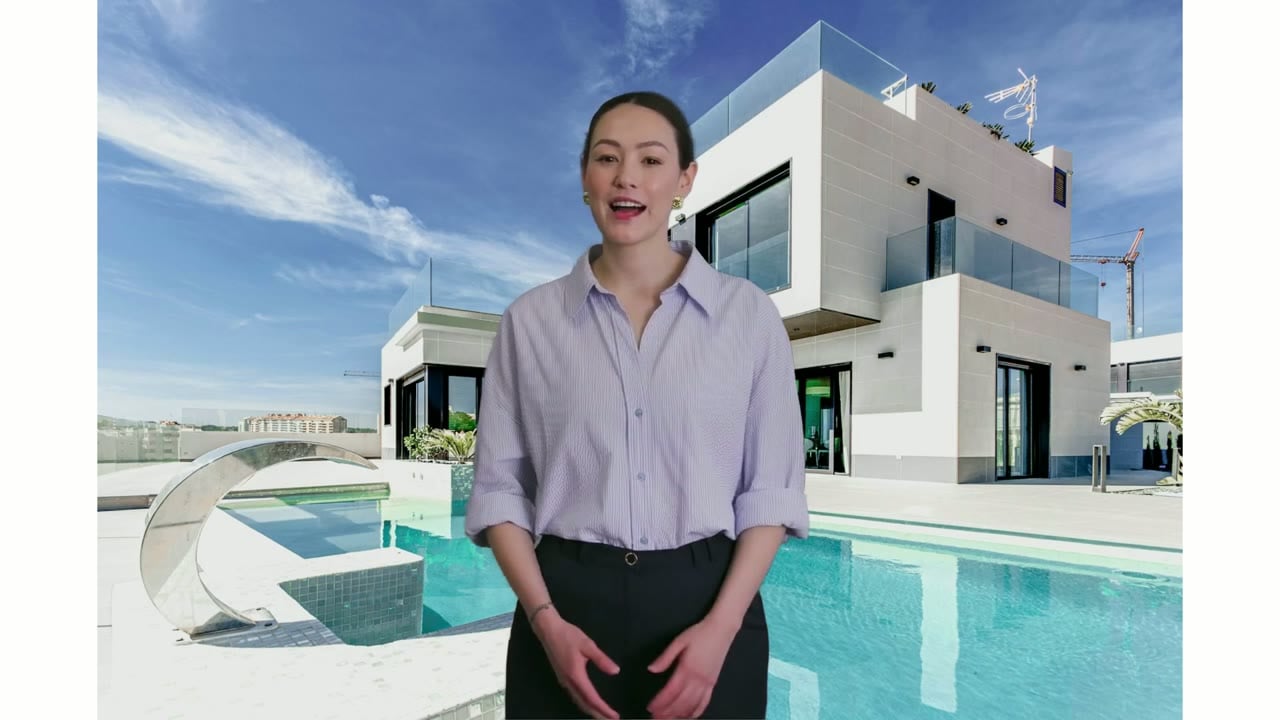
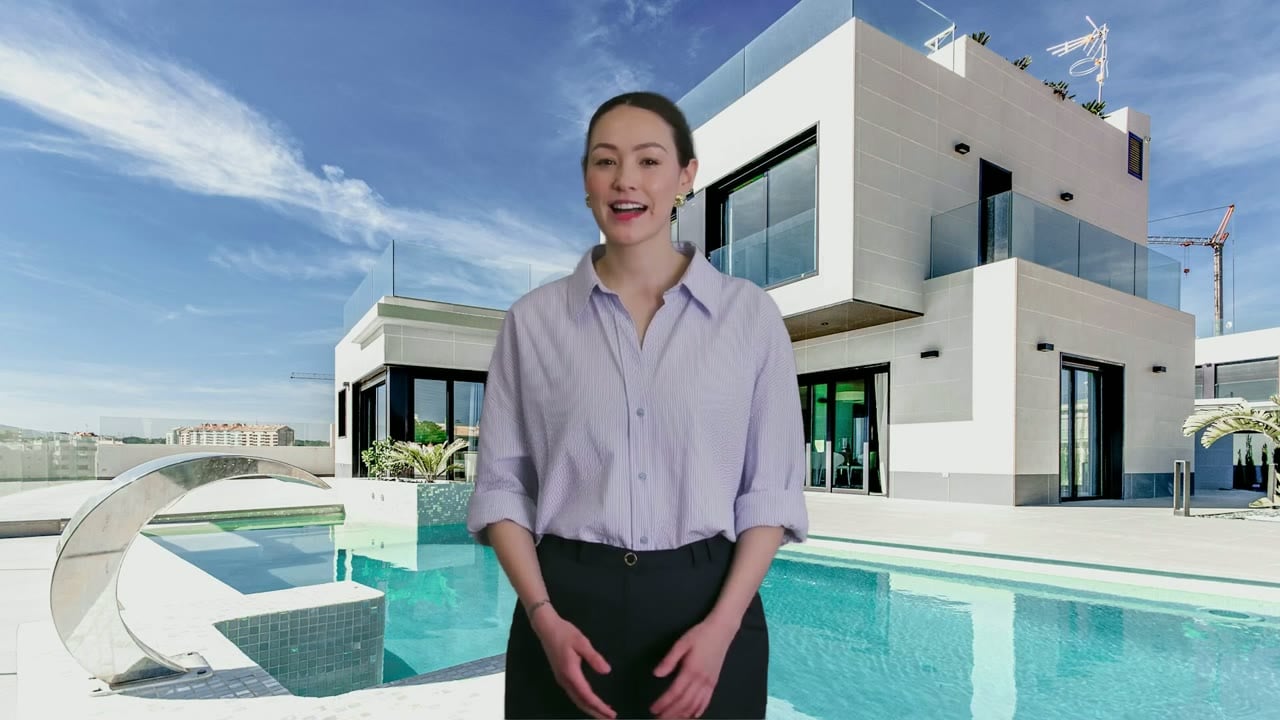
The response comes back right away with the new video's `id`. Both videos below came from the same template:
Only the text and photo were sent. Brandon and his voice came from the template.
The request above: Caroline, her own voice, and new text and photo.
**Always send every text variable.** A text variable you leave out is not filled with its default. HeyGen reads the placeholder name out loud instead. This video was generated with only `address` sent, and it says *"Hi, I'm Agent Name with Brokerage... It's listed at price."*
Read the list of variables from `GET /v3/templates/{template_id}` and fill all the text ones, so a variable added to the template later never slips through.
### Use `fit: "cover"` for full-frame backgrounds
A swapped image defaults to `fit: "contain"`, which fits the whole photo inside the frame and fills the rest with a solid color. For a background that fills the frame, send `"fit": "cover"`.
## Step 6: Wait for the video
Poll [`GET /v3/videos/{video_id}`](/reference/get-video) until `status` is `completed` (or `failed`), or pass `callback_url` on the generate call to get a webhook instead. When you generate many videos, use webhooks: polling each one adds up against your rate limit.
```bash cURL theme={null}
curl "https://api.heygen.com/v3/videos/9d4b7e2a5c1f4a8e9b3d6c0f2e7a1b58" \
-H "x-api-key: YOUR_API_KEY"
```
```json Example response (200 OK, completed) theme={null}
{
"data": {
"completed_at": 1790738122,
"created_at": 1790737782,
"duration": 13.5576,
"gif_url": "https://resource2.heygen.ai/example-preview.gif",
"id": "9d4b7e2a5c1f4a8e9b3d6c0f2e7a1b58",
"status": "completed",
"thumbnail_url": "https://files2.heygen.ai/example-thumbnail.jpg?Expires=...&Signature=...",
"title": "Listing - 7 Birch Court (Caroline)",
"video_page_url": "https://app.heygen.com/videos/9d4b7e2a5c1f4a8e9b3d6c0f2e7a1b58",
"video_url": "https://files2.heygen.ai/example-video.mp4?Expires=...&Signature=..."
}
}
```
`video_url` and `thumbnail_url` are signed links that expire. Call this endpoint again whenever you need fresh ones.
## The whole flow in one script
Creates the source video, promotes it, declares variables from the composition, generates one video per listing, and waits for each.
```python Python theme={null}
import time
import requests
API = "https://api.heygen.com"
HEADERS = {"x-api-key": "YOUR_API_KEY"}
def call(method, path, **kwargs):
response = requests.request(method, API + path, headers=HEADERS, **kwargs)
response.raise_for_status()
return response.json()["data"]
# 1. Source video, written with real values
video = call("POST", "/v3/videos", json={
"type": "avatar",
"title": "Listing - 42 Maple Lane (template source)",
"avatar_id": "Brandon_Business_Standing_Front_public",
"voice_id": "513b14b431b64a578c467c480dd0a9c3",
"script": (
"Hi, I'm Brandon with Bayview Realty. Take a look at 42 Maple Lane: three bedrooms, "
"a sunny kitchen, and a backyard made for summer. It's listed at $749,000. "
"Book your private tour today."
),
"remove_background": True,
"background": {"type": "image", "url": "https://images.unsplash.com/photo-1568605114967-8130f3a36994?w=1920&q=80"},
"aspect_ratio": "16:9",
"resolution": "1080p",
})
# 2. Promote it (no need to wait for the render)
template = call("POST", "/v3/templates", json={"video_id": video["video_id"], "name": "Listing video - agent intro"})
# 3. Find the parts to bind
scene = template["composition"]["scenes"][0]
avatar = next(e for e in scene["elements"] if "character" in e["bindable_as"])
# 4. Declare the full variable list
template = call("PUT", f"/v3/templates/{template['id']}/variables", json={
"expected_edit_version": template["edit_version"],
"variables": {
"agent": {"type": "character", "element_id": avatar["id"]},
"agent_voice": {"type": "voice", "element_id": scene["script"][0]["id"]},
"listing_photo": {"type": "image", "element_id": scene["background"]["id"]},
"agent_name": {"type": "text", "match": "Brandon"},
"brokerage": {"type": "text", "match": "Bayview Realty"},
"address": {"type": "text", "match": "42 Maple Lane"},
"price": {"type": "text", "match": "$749,000"},
},
})
text_variables = [name for name, v in template["variables"].items() if v["type"] == "text"]
# 5. One video per listing
listings = [
{"agent_name": "Brandon", "brokerage": "Bayview Realty", "address": "18 Harbor View Drive",
"price": "$1,125,000", "photo": "https://images.unsplash.com/photo-1570129477492-45c003edd2be?w=1920&q=80"},
{"agent_name": "Caroline", "brokerage": "Summit Homes", "address": "7 Birch Court",
"price": "$615,000", "photo": "https://images.unsplash.com/photo-1600596542815-ffad4c1539a9?w=1920&q=80",
"avatar_id": "Caroline_Business_Standing_Front_public", "voice_id": "f8a2cbd411e84454afc4aba8895d0a3b"},
]
video_ids = []
for listing in listings:
variables = {name: {"type": "text", "content": listing[name]} for name in text_variables} # every text variable
variables["listing_photo"] = {"type": "image", "asset": {"type": "url", "url": listing["photo"]}, "fit": "cover"}
if "avatar_id" in listing: # otherwise the template's agent and voice are used
variables["agent"] = {"type": "character", "avatar_id": listing["avatar_id"]}
variables["agent_voice"] = {"type": "voice", "voice_id": listing["voice_id"]}
job = call("POST", f"/v3/templates/{template['id']}", json={"title": listing["address"], "variables": variables})
video_ids.append(job["id"])
# 6. Wait for each (at scale, pass callback_url instead of polling)
for video_id in video_ids:
while (status := call("GET", f"/v3/videos/{video_id}"))["status"] not in ("completed", "failed"):
time.sleep(15)
print(video_id, status["status"], status.get("video_url"))
```
## Rename and delete
### Rename
`PATCH` renames the template and returns the full template. Renaming does not change `edit_version`. Other changes go through `PUT /v3/templates/{template_id}/variables` or the HeyGen editor.
```bash cURL theme={null}
curl -X PATCH "https://api.heygen.com/v3/templates/6f2a9c4e1b7d4f3a8e5c2b9d0a1f7e64" \
-H "x-api-key: YOUR_API_KEY" \
-H "Content-Type: application/json" \
-d '{"name": "Listing video - agent intro (v2)"}'
```
```jsonc Example response (200 OK, abbreviated) theme={null}
{
"data": {
"id": "6f2a9c4e1b7d4f3a8e5c2b9d0a1f7e64",
"name": "Listing video - agent intro (v2)",
"edit_version": "1",
"updated_at": 1790737790,
// also returned: the rest of the template, unchanged
}
}
```
### Delete
`DELETE` removes the template from your list so it can no longer generate videos. Videos you already generated from it are not affected. There is no request body.
```bash cURL theme={null}
curl -X DELETE "https://api.heygen.com/v3/templates/6f2a9c4e1b7d4f3a8e5c2b9d0a1f7e64" \
-H "x-api-key: YOUR_API_KEY"
```
```json Example response (200 OK) theme={null}
{
"data": {
"deleted": true,
"id": "6f2a9c4e1b7d4f3a8e5c2b9d0a1f7e64"
}
}
```
Reading a deleted template afterwards returns a 404:
```json Example response (404 Not Found) theme={null}
{
"error": {
"code": "template_not_found",
"doc_url": "https://developers.heygen.com/docs/error-codes#template-not-found",
"message": "HeygenTemplate not found"
}
}
```
## Errors
| Status and code | When it happens | What to do |
| - | - | - |
| `400` `template_source_unsupported` | The source video has no current-format draft (URL-to-Video, older editor videos). | Recreate it with `POST /v3/videos`, or save it in the HeyGen editor. |
| `400` `variable_match_not_found` | A `match` text doesn't occur in the template's script or on-screen text. Matching is exact and case-sensitive. | Check the current text in `composition`. If it's already a `{{name}}` placeholder, declare the variable without `match`. |
| `400` `variable_match_spans_styles` | The `match` text runs across differently styled parts of rich text, such as half bold and half regular. | Match a shorter piece inside one style, or make the styling uniform in the editor. |
| `400` `template_limit_reached` | The workspace already has the maximum number of templates (2000). | Delete templates you no longer need, then retry. |
| `403` `insufficient_api_key_scope` | The API key is missing a scope the endpoint needs. | Check the key's permissions against the endpoints table above. |
| `403` `forbidden` | Your role is below Creator, or template creation is turned off in the workspace settings. | Ask a workspace admin. |
| `404` `video_not_found` | The `video_id` isn't in this workspace. | Check the ID, and that the API key belongs to the same workspace. |
| `404` `template_not_found` | The template ID is wrong, in another workspace, or deleted. | List your templates with [`GET /v3/templates`](/reference/list-templates). |
| `409` `stale_edit_version` | The template changed after you read it. | Read it again, apply your change to the new list, and send it with the new `edit_version`. |
## FAQ
Any avatar look you can use, from [`GET /v3/avatars/looks`](/reference/list-avatar-looks), including your own digital twin or photo avatar. Pair a `character` variable with a `voice` variable so the voice matches the person.
Declare the text variable without `match`, for example `"first_name": { "type": "text" }`. Placeholders that already exist are kept.
Yes. Pass `scene_ids` on the generate call to pick, reorder or repeat scenes that exist in the template.
## Related
Every variable type, asset input and generate option.
The same flow, with the template built in the HeyGen editor.
This documentation is built and hosted on [Mintlify](https://mintlify.com), a developer documentation platform.
 In this template there are three parts:
| Part | Where it is in the response | `id` | `bindable_as` |
| - | - | - | - |
| The listing photo | `composition.scenes[0].background` | `bg_image_0_1790737769242_8e1hrymj6` | `image` |
| The agent on screen | `composition.scenes[0].elements[0]` | `avatar_0_1790737769242_ltg7rc9hp` | `character` |
| The spoken line | `composition.scenes[0].script[0]` | `script_0_1790737769242_2bae1yu2m` | `voice`, `text` |
Your template will have different IDs. Take them from the `composition` in your own response.
A template can also contain on-screen text, image and video elements, and `composition.background_audio` tracks for music and sound effects that bind as `audio`. Call `GET /v3/templates/{template_id}` at any time to read the same structure again.
In this template there are three parts:
| Part | Where it is in the response | `id` | `bindable_as` |
| - | - | - | - |
| The listing photo | `composition.scenes[0].background` | `bg_image_0_1790737769242_8e1hrymj6` | `image` |
| The agent on screen | `composition.scenes[0].elements[0]` | `avatar_0_1790737769242_ltg7rc9hp` | `character` |
| The spoken line | `composition.scenes[0].script[0]` | `script_0_1790737769242_2bae1yu2m` | `voice`, `text` |
Your template will have different IDs. Take them from the `composition` in your own response.
A template can also contain on-screen text, image and video elements, and `composition.background_audio` tracks for music and sound effects that bind as `audio`. Call `GET /v3/templates/{template_id}` at any time to read the same structure again.